Compare Glasp, Youtube Highlighter, and Voila: Which Extension is the Best?
AI-powered web highlighter for websites, PDFs, and YouTube videos. Build your AI clone from highlights and connect with 1M+ learners worldwide. | Highlight and annotate YouTube transcripts. Generate AI summaries and chat with the video content to turn it into clear, searchable notes and annotations. | ||
| Key Features A summary of the most important features offered by each extension. |
|
| • Universal Website Integration: Works on any website with context awareness • Gmail Integration: Seamless email drafting and AI-powered instant replies • Expert Prompt Library: Pre-built prompts for various content types • Web Research: Real-time information gathering with reliable sources • Multi-language Support: Works in over 50 languages • Cross-platform Availability: Browser extension, desktop, and mobile apps • Privacy-First Design: GDPR compliant with no data storage on servers |
| Our Rating Tooltivity's expert review score for each extension, based on hands-on testing and research. | 8.9 | 9.5 Winner in this category | 9.1 |
| Total users Total active users across all major browsers: Chrome, Edge, Firefox, and Safari. | 507,403 Winner in this category | 230 | 89,383 |
| Total ratings Total number of user ratings received across all supported browsers. | 908 Winner in this category | 6 | 252 |
| Average rating Average user rating across all browsers, calculated from available store ratings. | 4.2 ⭐ | 5.0 ⭐ Winner in this category | 4.3 ⭐ |
| Entry Level Price The minimum price required to start using the extension. "Free" means a free tier is available. | Free | Free | Free |
| Chrome User rating and stats for the extension on Chrome browser. |  4.5 4.29 Average Chrome Web Store rating from the last 100 reviews 500.0K+Users | 5.0 5.0 Average Chrome Web Store rating from the last 100 reviews 230Users Winner in this category | 4.7 4.82 Average Chrome Web Store rating from the last 100 reviews 80.0K+Users |
| Edge User rating and stats for the extension on Edge browser. |  4.0 4.25 Average Microsoft Edge Store rating from the last 100 reviews 7.4K+Users | - | 4.1 4.11 Average Microsoft Edge Store rating from the last 100 reviews 6.3K+Users Winner in this category |
| Firefox User rating and stats for the extension on Firefox browser. | - | - |  4.2 4.00 Average Mozilla Firefox Add-ons Store rating from the last 100 reviews 3.0K+Users Winner in this category |
| Safari User rating and stats for the extension on Safari browser. | - | - | - |
| Features Tooltivity's expert score for the 'Features' aspect of each extension. | 9.5 Highlighting features: In our tests, Glasp's highlighting features worked flawlessly. We were able to highlight text on a variety of websites, in PDF files, and even in YouTube transcripts without any issues. Thanks to the numerous color options and the ability to add notes to each highlight, we were able to easily organize and retrieve our information across different types of content. AI integration: We tried the AI summary feature with ChatGPT, Claude, and Gemini and found the results really useful for summarizing our highlights and asking questions. Social learning: We explored the social features by browsing other users' highlights and sharing our own. However, we found it a bit intrusive that this is mandatory in the free version. Export options: Exporting our highlights to Obsidian and Notion worked smoothly. We tested all available formats (Markdown, HTML, CSV, JSON) and found the flexibility helpful for integrating Glasp into our existing workflows. | 9.8 1. YouTube Transcript Highlighting 🎥 YouTube Highlighter excels at one thing better than any other tool we tested—making YouTube videos truly interactive and study-friendly. You don't even need an account. Just visit any YouTube video with captions, click the highlight button in the player controls, and start highlighting the transcript text. Once highlighted, your highlights are visible on the transcript and persist when you revisit the video. The best part: Your highlights will also be visible if you reload the page or return to the video later.There are two main ways to start highlighting:
In our tests, we could easily highlight educational content, TED talks, and tutorial videos, and those highlights were effortlessly restored when revisiting them. It works seamlessly with both auto-generated and manual captions. Highlighted YouTube video with transcriptAll of your highlights are not only visible on the transcript but also accessible through the sidebar, which gives you a comprehensive overview of your video study materials. This creates a study environment similar to traditional note-taking apps, but specifically designed for video content. 2. Time-Synced Video Playback ⏱️ Seamless integration between transcript and videoOne of the most impressive features is how smoothly the transcript synchronizes with video playback. The current sentence being spoken is highlighted in real-time, and you can click any part of the transcript to jump to that exact moment in the video.The auto-scroll feature keeps the current sentence in view as the video plays, creating a distraction-free study environment. You can toggle this feature on or off as needed.Time-synced transcript with video playbackThis synchronization makes it incredibly easy to:
3. AI-Powered Video Summaries ✨ Transform long videos into digestible insights. The AI summary feature works exceptionally well with YouTube content, giving you quick overviews of video content in multiple formats. The AI summary feature works entirely offline with Chrome's built-in LLM, making it both super fast and completely private. It analyzes the entire video transcript to create intelligent summaries.You can choose from different summary styles depending on what you need:
Length options include:
4. Multi-Language Support 🌍 Study content in your preferred language. The extension automatically detects available caption languages and lets you switch between them seamlessly. This is particularly useful for:
5. Study-Friendly Customization 🎨 Personalize your learning environmentThe reader mode offers extensive customization options to create the perfect study environment:
6. Notes & Tags System 📝 You can create tags and notes by clicking on highlights in the transcript. This opens a popup allowing you to add tags and notes to specific video moments.Any changes you make are immediately visible in the sidebar, making it a perfect research tool for educational content, tutorials, and long-form videos.Inside the sidebar, you can find all your highlights and notes organized by tags, making it easy to:
7. Export & Integration Options 📤 YouTube Highlighter gives you comprehensive export options for your video research:
The export functionality preserves timestamps, making it easy to reference specific video moments in your external notes. 8. Offline & Privacy-First Approach 🔐 The extension works entirely offline without requiring an account, ensuring complete privacy. Even when you choose to sync via the web app, your highlights, notes, and video research remain private by default.Your data isn't sold to third parties, nor is it used for advertising or profiling. This dedication to privacy makes it ideal for sensitive research, personal study materials, and confidential educational content. Winner in this category | 9.0 Voilà's features are impressively comprehensive and cover many areas, from simple AI chat to advanced content creation tools. 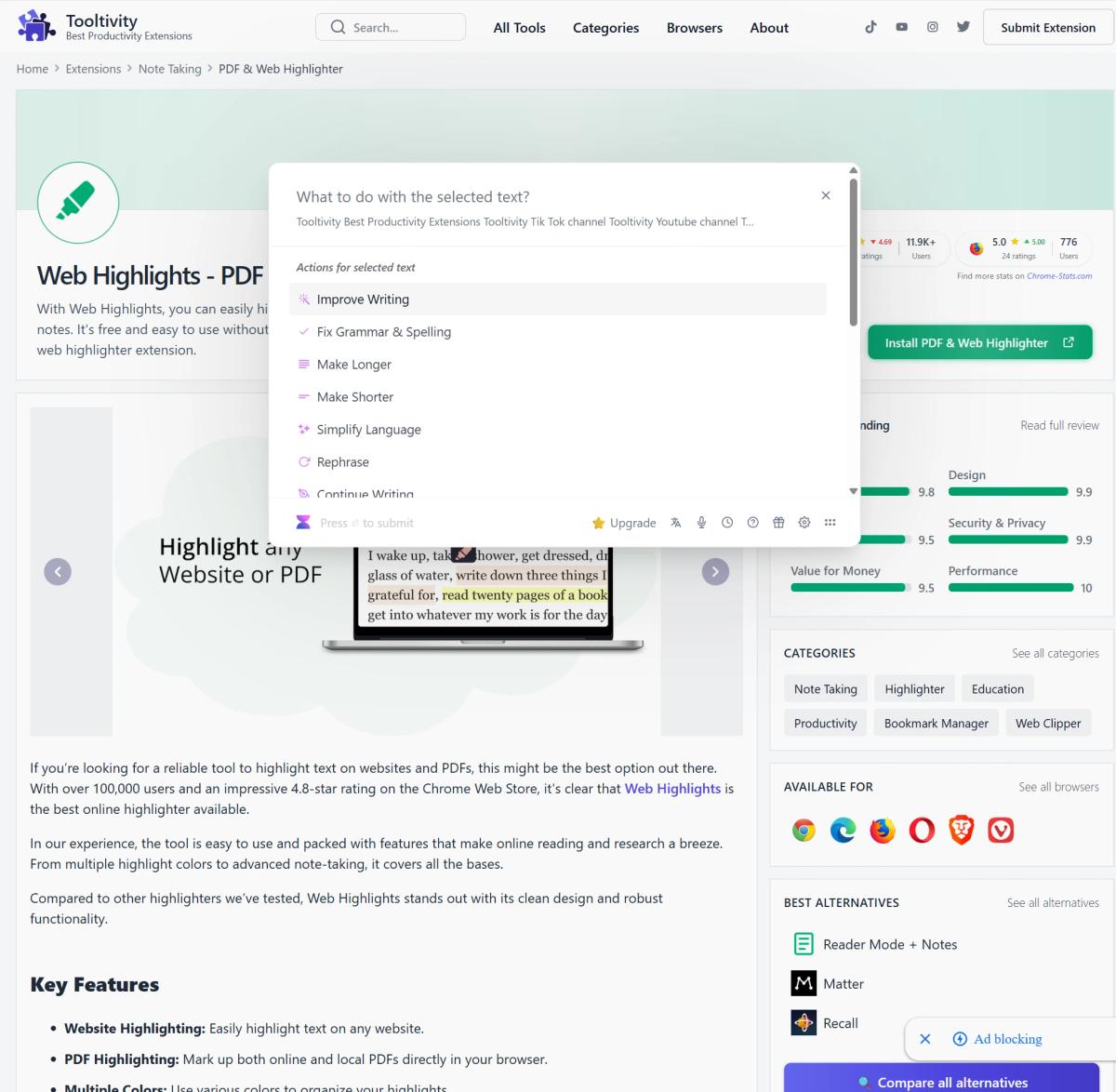 The integration with Gmail works flawlessly and makes email management much more efficient. The ability to respond to emails in a context-sensitive manner sets the tool apart from many of its competitors. 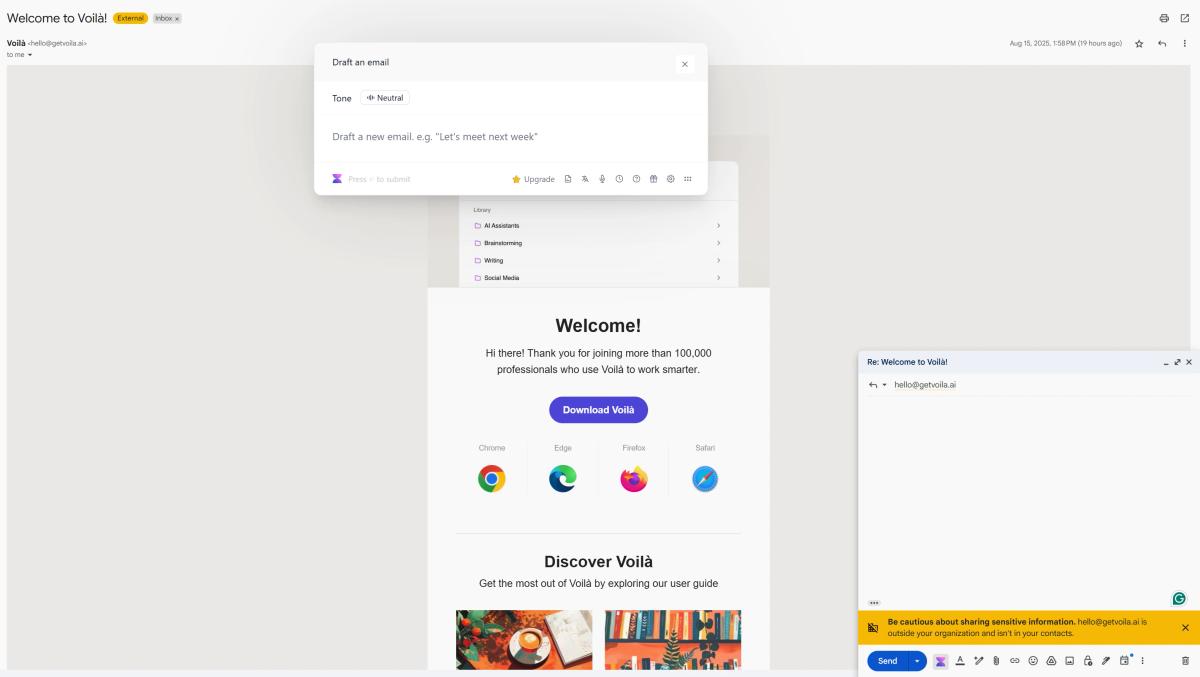 On websites, it is first necessary to highlight the desired text. However, if you want a summary of the website, for example, this is not a problem because you can simply highlight the entire website. A context-based AI chat that has access to the context of the current website would improve this even further. 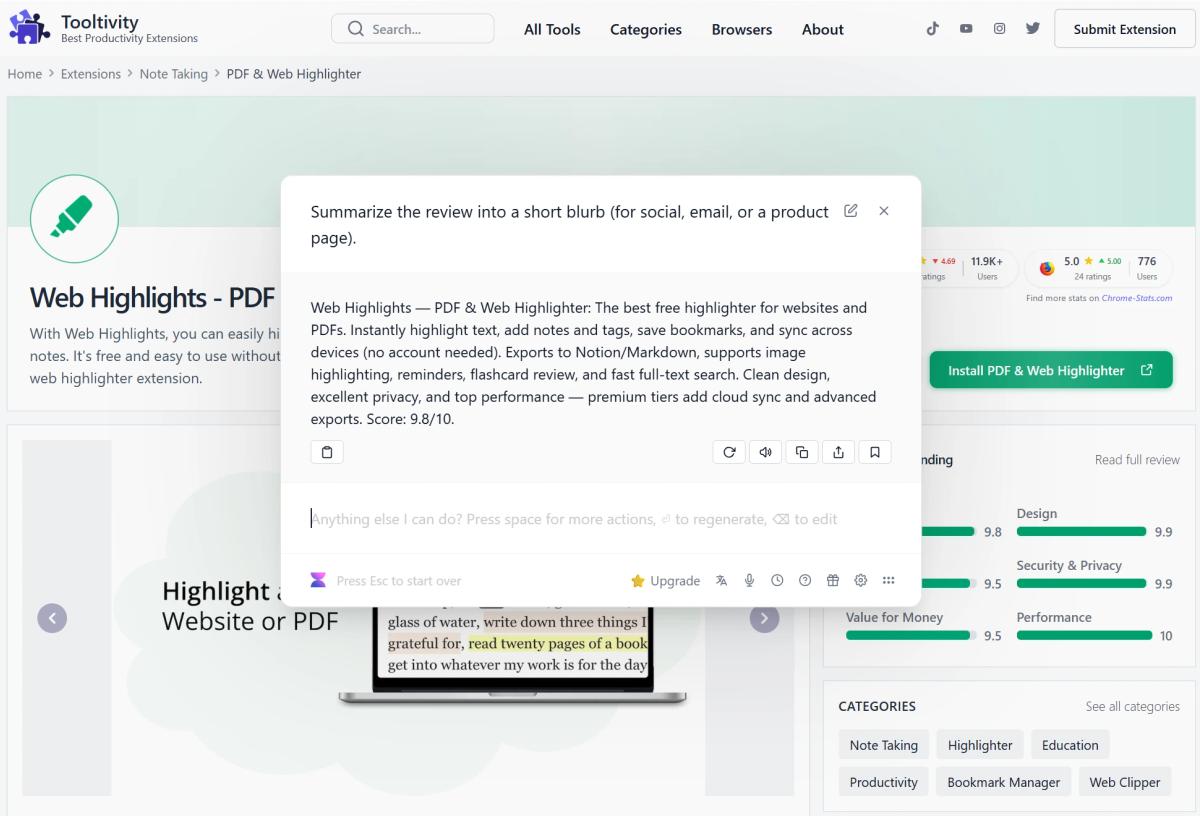 Overall, the extension offers very powerful features, some of which are not even found in competitors' products. |
| Performance Tooltivity's expert score for the 'Performance' aspect of each extension. | 8.7 In our experience, marking and saving content was quick and almost instantaneous on websites and in PDF files. The extension did not noticeably slow down our browsers. Most features worked reliably, but we occasionally encountered problems with YouTube transcription and AI summaries, which were also mentioned by users in their reviews. Winner in this category | 8.5 The extension performs seamlessly once the transcript is loaded, allowing you to highlight video transcripts and sync with playback without any lag or interruptions. It can sometimes take a few seconds for the video transcript to load initially, depending on the video's caption availability and your internet connection. The AI summary functionality is quick and accurate once the transcript is available, enabling you to get instant overviews of video content. Additionally, the ability to sync your video research across devices ensures that you can access your study materials from anywhere. The best part is that the core functionality works entirely offline once the transcript is loaded, so you can study with videos even without an internet connection. | 8.7 In our test, Voilà consistently delivered good performance on various websites and in different use cases. The AI responses are usually fast and relevant. The extension has no noticeable impact on browser performance. Some users report occasional delays during peak times, but this is common with AI tools. The tool processes large documents and complex queries without any problems. Winner in this category |
| Design Tooltivity's expert score for the 'Design' aspect of each extension. | 9.3 During our tests, the user interface appeared clear and intuitive. The sidebar did not interfere with reading, but was accessible at all times to view highlights and notes. We liked the color-coded highlights, which made it easier to scan and visually organize information. | 9.6 The design is clean and intuitive, with a focus on reducing distractions while studying. We loved the seamless integration with YouTube's interface and the customizable reader mode that adapts to different study preferences.What users love most is the time-synced playback and the ability to jump between transcript and video effortlessly. The multi-language support and customization options make it suitable for diverse learning needs.The reader mode also looks great on different screen sizes, making it simple to study on various devices. Winner in this category | 9.3 The user interface is clear and intuitive. The seamless integration with Gmail is particularly well done. |
| Value for Money Tooltivity's expert score for the 'Value for Money' aspect of each extension. | 8.8 We made extensive use of the free plan and found that unlimited tagging and basic organization and access to the social network is more than sufficient for most users. For heavy users, especially researchers and content creators, the additional AI features and private tags are worth the price of the Pro plan. The price is similar to that of competitors. Compared to other tools we've tested, Glasp offers a more comprehensive set of features, making the price competitive in the knowledge management space. For those of us who rely on knowledge management in our work, the time savings and improved organization easily justified the Pro subscription. | 9.0 YouTube Highlighter can be used for free without signing up, providing access to a wide range of offline features including highlighting, note-taking, and basic AI summaries. Free users can highlight one video per day, but once you start highlighting a video, you can create unlimited highlights within that video.To fully enjoy the benefits, including unlimited video highlighting, unlimited AI summaries, advanced export options, and cloud sync across devices, you can upgrade to the PREMIUM or ULTIMATE version. The pricing plans are affordable, making it a cost-effective solution for students, researchers, educators, and anyone who learns from video content. No other tool gives you this much value for transforming YouTube into a study platform. Winner in this category | 8.9 The free plan offers a good introduction to Voilà's features, but is quite limited. The premium plan for $6 per month offers excellent value for money for anyone who finds that they use the tool regularly after using up their free requests. In our opinion, the advanced features, such as chatting with YouTube videos and generating images, justify the price. For frequent users who also want to use AI for their documents or chat with images, the Ultimate version is worthwhile. At $14, the price is still relatively inexpensive compared to competitors with similar features. |
| Ease of Use Tooltivity's expert score for the 'Ease of Use' aspect of each extension. | 9.0 Setting up Glasp was quick—we installed the extension, created an account, and were able to start tagging within minutes. The introductory video was clear and helped us get up to speed quickly. When we looked at features such as creating AI clones and advanced export options, it became a little more complex. It took some trial and error to figure out how to best use these tools. Overall, the tool is definitely designed so that anyone can use most of its features. | 9.8 We can't think of a simpler way to transform YouTube videos into study materials. The best part? It works seamlessly right out of the box, no account needed.
Winner in this category | 9.4 Voilà offers an excellent balance between performance and simplicity. The tutorial system is well-designed and suitable for beginners. The keyboard shortcuts make navigation intuitive once you have learned them. The context-sensitive functions work automatically, so manual configurations are rarely necessary. Creating custom prompts and actions takes some time to learn, but it is worth the effort. |
| Security & Privacy Tooltivity's expert score for the 'Security & Privacy' aspect of each extension. | 8.0 During our review, we found that Glasp collects website content and some personal data to enable its features. By default, some of our highlights were shared publicly. We had to adjust our settings to keep the information private. Therefore, it is important to be aware of this, especially since it is mandatory for free users. | 10 In the Security & Privacy category, we give YouTube Highlighter a solid 10/10. The fact that you can use this tool offline without needing an account sets it apart from its competitors. Even if you opt for cloud sync by creating an account, YouTube Highlighter puts data privacy first. Your highlights, notes, and video research are visible only to you by default unless you decide to share them. Your data isn't sold to third parties, nor is it used or transferred for anything beyond the extension's core functionality. This dedication to data privacy ensures your educational research stays secure and confidential. Winner in this category | 9.0 Data protection is a high priority for Voilà. The extension complies with the GDPR and transparently lists its data processing methods. The tool does not store conversations on its servers, which is important for companies, among others. The privacy policy is comprehensive and explains data usage clearly and concisely. The option to use your own API keys offers additional control and flexibility for anyone who needs it. The only minor criticism is the use of third-party analytics tools, which is a common practice for such extensions. |
| Conclusion A summary of our findings and final thoughts for each extension. | Glasp Web Highlighter has proven in testing that it can help users interact with digital content in a useful way in their everyday lives. It is not just a highlighting tool, but a comprehensive organization system that combines the best aspects of social learning with AI technology. What we particularly appreciate about Glasp is that it encourages a more intensive engagement with the content. Instead of passively bookmarking pages, users are motivated to highlight specific passages and add notes, which leads to better retention and understanding. It is therefore particularly specialized in learning content. However, Glasp is not without its challenges. The limitations of the AI features and privacy restrictions in the free version may be problematic for many users. In addition, some users report technical issues with the YouTube transcription features. For researchers, students, and content creators who are seriously interested in building a kind of second brain, Glasp offers compelling value. The combination of highlighting, AI summarization, and social learning creates a unique ecosystem that is difficult to replicate with other tools. Casual users, however, may find the complexity and pricing structure daunting. | No conclusion available | Voilà impressed us with its seamless integration, especially with Gmail, and its powerful AI features. It is a tool that simply aims to integrate AI into everyday life for every user in order to simplify everyday tasks. The free plan allows you to test it out sufficiently, and if you're convinced, the Pro plan offers excellent value for anyone who values productivity. The tool's ability to respond to emails contextually and directly integrate highlighted text from any website sets it apart from the competition. The only thing that could improve it is the ability to directly integrate the current website without highlighting text. We recommend Voilà for professionals, content creators, and anyone who wants to optimize their AI-powered workflow without sacrificing privacy or functionality. |
| Our Recommendation | In our comparison between Glasp, Youtube Highlighter, and Voila, Youtube Highlighter came out on top, scoring 9.5. Glasp is the most widely used, with over 507k users and 908+ reviews, but Youtube Highlighter outperformed it in our review. User reviews reflect our findings. Notably, Youtube Highlighter has the highest user rating in the Chrome Web Store at 5.00, which supports its strong performance in our review. There are some noticeable differences between these extensions, so it's worth considering your priorities and the details below.
If you want a quick recommendation, Youtube Highlighter is our top pick. But as always, the best choice depends on what matters most to you. | ||


